Showing posts with label Apps. Show all posts

Tuesday, June 7, 2011

Skype Stopped Working? Solution is...(2011/6/7)


For issue of Skype's stopping work.

Solution is Simple: You have to Uninstall and Re-Install Skype by using new(Latest) Skype Setup file.

2011 © TechTubeWikia 

Thursday, May 26, 2011

Skype Not Working? Solution Here!


This is only for the issue happens on 2011 May 26th .


1. Execute RUN tool by Click Start, type run and press Enter. (On Windows 7 :press Windows key+ "R" key || On Windows XP: Click Start and then Run.)


2. Type the following on RUN Dialog and click OK: %appdata%\skype


3. Locate and delete the file shared.xml.


4. Then issue will be resolve. 


2011 © TechTubeWikia 

Thursday, December 23, 2010

Skype-Down-Why?


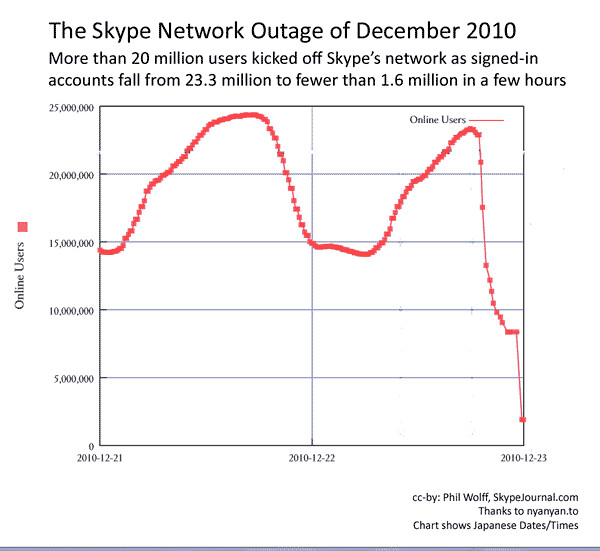
Skype sever takes rest on 22nd December 2010. Actually its shut-down due to massive load that it takes on that day.

The Result is millions of people couldn't  get their phone calls due to that down. But the funniest thing is when it is down Twitter Users at that moment goes Up. Because most of the Skype users trying to use Twitter Direct Messages on behalf of Skype.

This image shows how it looked like on 22nd December 2010.(This shows number of Skype users on that day)


In theory, Skype, which is based on peer-to-peer networking technology shouldn’t see an outage.

TmcNet tells this kind of thing about that Shutting down.
"They also had a DNS issue back in 2004. Not exactly good timing with the impending IPO and people wanting to wish each other Merry Christmas in 3 days. I was able to login, but my buddy list looks mostly offline, which is very unusual.

This is what Skype saying at that moment on their Twitter Channel.(Source:TechCrunch)


Someone posted this Video to Youtube about the Skype's shutting down.

 
Hope as soon as possible they may overcome those all problems. :)

Sunday, March 28, 2010

Beginning Flex !


As you all know ,now Adobe Flex become a world's richest Internet Application framework. 
Adobe Flex is a software development kit released by Adobe Systems for the development and deployment of cross-platform Rich Internet Applications.
Adobe Flex is based on Flash technology.
As you can see picture below, it shows the basic interpretation of the Flex Application.


Flex apps have powerful , richest components.
What are those components/elements?

There are six basic elements .

1.Flex Framework -
  • It has containers to use to layout Applications.
  • It also use to gather data such as buttons,text...etc.
  • It has a event driven development model.
  • It also supports data binding/ validation ... etc.
2.MXML files
  • Flex application contains at least one MXML file and Flex applications use those MXML files for manipulate lots of jobs and it also a bridge to connect with irrelevant formats with Flex. 
  • This is named as main Application File.
3.Action Script 3.0
  • Flex applications have multiple dynamic behaviors. Those highly dynamic behaviors are create by using action script technology and it is looks like java scripts.
  • It can be contained in or outside the MXML file.
4.CSS
  • Cascade style sheets used to define style attributes on visual components.
5.Data 
  • Combo boxes,data grids 
  • Those can be populate using arrays, collection objects, data models, external xml files... etc
Important aspects of Flex Apps:
  • Flex apps never require to use server side apps. Because those apps run and compile on our local machine.
  • How ever if we want to use those external data services we can use Flex data service 2, coldfusion Flash remote services, Java/J2EE services...etc.
  • And remember we have to deploy those on an application server as well.
Lets see how to write a simple application using Flex

  • Normally we can use simple text editor to edit Flex applications.
  • But generally and commercially eclipse IDE used to develop Flex apps.

  • And you can use Adobe Catalyst as a design tool for Flex.
               On October 2, 2007, Adobe announced a new design tool related to Flex codenamed Adobe Thermo. On November 17, 2008 Adobe announced the official name of the product would be Adobe Flash Catalyst.

Lets see how to write a hello world app!


As you can see in the second image it shows the code which outputs the result in first image.I used Flex Builder 2 (built on Eclipse) as my IDE.

First of all we have to mentioned the file type and encoding type and proper xml version.


Validate application using name spaces which refer following URL and have to say layout state.

We have to define A panel . If we do not create such a panel there will be a mixture of characters. :D

I am going to say that who I am by using text area .

We can manipulate button . But this but haven't any action when it is clicked.But its looks likes as image1.

We should close the tags which we are opened.


Adobe Flex 4 - has New Features and awesome!


  • Adobe released Flex 4.0 (code named Gumbo) on March 22th 2010 . The Flex 4 development is called Adobe Flash Builder, formerly known as Adobe Flex Builder.

  • Some themes that have been mentioned by Adobe and has been incorporated into Flex 4 are as follows:

  • Design in Mind: The framework has be designed for continuous collaboration between designers and developers.

  • Accelerated Development: Be able to take application development from conception to reality quickly.

  • Horizontal Platform Improvements: Compiler performance, language enhancements, BiDi components, enhanced text (Flex 4 includes the new Text Layout Framework ).

  • Full Support for Adobe Flash Player 10 and above.

  • Broadening Horizons: Finding ways to make a framework lighter, supporting more deployment runtimes, runtime MXML.

  • Simpler skinning than the previous versions.

  • Integration with Adobe Flash Catalyst.

  • Custom templates


Wednesday, February 24, 2010

Media Centers, FOSS and Boxee !


There are so many Media Centers available for any kind of platforms. Most of them come with free GPL, GNU license.
Following are some famous Media Centers:
•    Windows Media Center(Not for free)
•    Boxee (fork of XBMC, coming with some customizations)
•    XBMC (Free /Open Source)
•    Moovida (Free /Open Source)
•    Myth TV (Free)
•    Plex (Free /Open Source)

Also there are Media Center Operating Systems such as Windows Media Center Edition, GeeXBOX for Linux...Etc.
 
Boxee is great and awesome media Center . I also used it as my default Media Center. Automatic detection of proper subtitles for movies is the feature I like very much.

o    Boxee

 
Boxee is a cross-platform freeware media center software with a 10-foot user interface and social networking features designed for the living-room TV.

Boxee is a fork of the free and open source XBMC media center software which Boxee uses as an application framework for its GUI and media player core platform, together with some custom and proprietary additions.
Boxee is still under development and is currently only available as alpha releases for Mac OS X, Windows, and Linux, as well as Apple TV, for computers with x86 architecture processors.

It will be the most popular Free and Open Source Media Center. Because it is fully armed with Social media Contents and Options like Twitter, Facebook etc.

Watch this Video : You can see all of the features that Boxee has.


o    Windows Media Center


Windows Media Center is an application with a 10 foot user interface designed to serve as a home entertainment hub for the living-room TV.
It is included in Win Xp Media Center Edition, which must be installed as an operating system. It is also included in premium editions of Windows Vista and Windows 7 .

It is designed to be controlled by special remote controls which prominently feature the Green Button, but can also be operated with a mouse and/or keyboard.
Playable Media: Media Center plays the computer user's pictures, videos, and music from local hard drives, optical drives, and network locations.

o     XBMC


XBMC (formerly named Xbox Media Center) is a cross-platform free and open source media player and home entertainment system application software with a 10-foot user interface design for the living-room TV.

It was originally created for the first-generation Xbox game console, but is now available for the Linux, Mac OS X, and Microsoft Windows operating systems.
Support Media : XBMC supports most common audio, video, and image formats, playlists, audio visualizations, slideshows, weather reporting, and third-party plug-ins.


o    Moovida


I have checked moovida on Ubuntu 9.10 and it is very well performed. But it is lack on keyboeadr and touchpad inputs.

Moovida (formerly Elisa) is a project to create an open source cross platform media center solution, with a 10-foot user interface design for the living-room TV, to be used with a remote control.
Primary development and deployment platform is Linux and Unix operating systems(Now also support Microsoft Windows and also hope to support Mac OS X in the future).


Moovida runs on top of the GStreamer multimedia framework and takes full advantage of hardware acceleration provided by modern graphic cards by using OpenGL APIs.


o   Plex


Plex, is an open source media center for Intel-based Apple Macintosh computers, it has a 10-foot user interface design for the living-room TV. It was forked from XBMC media center software on May 21, 2008.

The framework allows users to manage video, photos, podcasts, and music from a computer, optical disk, and the Internet using an Apple remote.


Most of the Media Centers Use 10 –Foot user interface for there develops. A 10-foot user interface is a software GUI (graphical user interface), designed for display on a large television (or similar sized screen), with interaction using a regular television-style remote control.
10-foot means menus, buttons, and fonts and so on.

Laptop Batterry Usage TIPs | Extend Its life !


If we purchased a Laptop all we got a battery with it .Some People don't know how to maintain a computer, specially non-technical guys. But the problem is even if we are keeping it in a good condition under good maintenance, we couldn't take it to a right place.

When we talking about Laptops there are basic and main features available for paying attention than others.

1.Battery

2.Display

3.Keyboard / Touch Pad (Basically all I/O devices)

4.Harddisk


Those are very basic things which we can maintain outside from the Laptop by any persons(even Non-technical person).

Display Problems, Hard Disk Problems and I/O problems which can be coming are willing to explain in future post. It is a pleasure to say those are from my and my friends experiences.[ :( ]

Today my main topic is about Battery.

When we talking about Maintaining approach,

Battery is the Most valuable thing in the Laptop according to my view.

Because if you have to replace battery one-day you have to pay about $120(Rs. 12000) - $200(Rs.20000) for brand new Battery. It will be a big amount when comparing with whole laptop's price.

Windows 7 and Laptop's Battery:


Normally You can see a notification like above if you are using Windows 7.

It'll say how much of time we can use PC and how much of power remaining.

But don't you ever seen like this?


What is this? When you seen a notification/ alert like this it may be the most frightening thing come-up from PC. [ :o ]

This has so many rumors all over thousands of blogs. I know it ,because I had a experience on this.

According to the Microsoft's engineers this is a option which came with Windows 7 to warn the states of battery. Bad or Good healthy situation.!


But I think,

It is more than enough sensitive ! It indicates "replacing your battery" even if there was a little lack in Capacities or any thing wrong with Battery.

How ever I think it will be a good option from Microsoft, because it helps me to findout defects on my battery. Thank you MS!

I have a Acer Laptop.

It is Acer Aspire 4736z. There is a inbuilt option with inbuilt button called PowerSmart .

Acer PowerSmart button:


The Acer PowerSmart button uses the power-saving features of computer’s graphics sub-system to reduce overall power consumption. When you press the Acer PowerSmart key, the Windows graphics scheme will be changed to Windows 7 Basic, screen brightness reduced and the graphics chip will be switched to a lower speed.If you Press the Acer PowerSmart key again it will return to your previous settings.


This is a absolutely smart option. But I cannot find out a proper software for calibrating my laptop automatically such as HP's Power Manager Software. It will automatically calibrate battery when such a situation come.

What is Calibrating a Battery means?
As a general rule, you should calibrate your battery every month or two to keep it running in top form.

Short discharges and recharges do not fully synchronize the battery's fuel gauge with the battery's state-of-charge. This can result in the amount of power available in one cycle being less than expected or the battery meter being inaccurate.

If we haven't such a automatic calibrating software we can do it manually.Please follow following steps.

For XP Users:

Step 1 - Disable the Windows Power Management

   1. In Windows, right-click the Desktop and select Properties in the menu list.

   2. Click the Screen Saver tab and then click the Power button.

   3. Under Power schemes, select Always On in the drop down menu.

   4. Under Settings for Always On power scheme, select Never in each of the drop down menus.

   5. Click OK on the Power Options Properties window and then click OK on the Display Properties window.


Step 2 - Fully charge the battery

   1. Connect the AC adapter to the notebook.

   2. Charge the battery until the Windows battery meter is at 100%.


Step 3 - Fully discharge the battery

   1. Remove the AC adapter.

   2. Keep the notebook on until the battery has completely drained and the notebook automatically turns off.

   3. Connect the AC adapter to the notebook.

   4. Keep the AC adapter connected to the notebook until the battery has completely charged.


Step 4 - Enable the Windows Power Management

   1. In Windows, right-click the Desktop and select Properties in the menu list.

   2. Click the Screen Saver tab and then click the Power button.

   3. Under Power schemes, select Portable/Laptop in the drop down menu.

   4. Click OK on the Power Options Properties window and then click OK on the Display Properties window.


For Win 7 Users :

Your power manager is available at control panel an you can easily access it using the power icon at task bar.And other steps are same.

After This steps your laptop battery will calibrated.

And Here are some TIPS for extending your Battery Life:

1. Sleep Is Good

Use the operating system's power-management features to set aggressive targets for when the display will go dark and when the machine will slip into sleep mode. And if you can spare the extra time it takes for the machine to resume, set the PC to hibernate, not just sleep, when you close the lid.

2. Dim the Lights

Turn down the brightness of the LCD panel .

3. Banish Non-Essential ComponentsWhen you aren't actively using the Wi-Fi, Bluetooth, and IR radios, turn them off (via the hard switch, if your PC has it, or in the appropriate utility set).

4. Watch Scheduled Tasks
When periodic virus scan is set to a time when you're usually plugged in.

5. Lay Off the Multimedia
Streaming music from your hard drive means the disk is always spinning.


Saturday, February 20, 2010

Did You think how much TM's Google Has?


Google conquered the famous web services and so many web related products when those products became popular. Did you ever think how much of trademarks and brands which Google has?

Google Trademarks and Suggested Accepted Generic Terms

The following are some of the trademarks owned by Google Inc. .

* AdSense For Content™ program
* AdSense For Domains™ program
* AdSense For Search™ program
* AdSense™ advertising service
* AdWords Authorized Resellers™ program
* AdWords Editor™ campaign management application
* AdWords™ advertising service
* Android™ mobile technology platform
* Blogger™ web publishing service
* Boomerang™ advertising service
* Broadcast Yourself™ service
* Chromium™ operating system
* Citizentube™ channel
* Claim Your Content™ content monitoring tool
* Closure™ tools
* Connectcommerce™ affiliate network
* Dalvik™ virtual machine
* DART™ advertising service
* Doubleclick™ advertising service
* Doubleclick Ad Exchange™ program
* Doubleclick Rich Media Dynamic Ads™ advertisements
* Doubleclick Rich Media™ advertisments
* Doubleclick Studio™ tool
* Feedburner™ services
* Feedflare™ service
* Gmail™ webmail service
* Goog 411™ service
* Google Ad Manager For Advertisers™ advertising service
* Google Ad Network™ advertiser network
* Google Adsense™ advertising service
* Google Advertising Professionals™ program
* Google Adwords™ advertising service
* Google Agency Land™ portal
* Google Alerts™ email update service
* Google Analytics™ web analytics service
* Google Answers™ research service
* Google App Engine™ platform
* Google Apps Connector™ software
* Google Apps Directory Sync™ provisioning tool
* Google Apps™ service
* Google Apps Labs™ program
* Google Audio Ads™ advertisements
* Google Base™ online database
* Google Blogs™ blog search
* Google Blog™ weblog
* Google Books™ book search
* Google Building Maker™ software
* Google Calendar™ calendaring service
* Google Checkout™ payment and billing service
* Google Chrome Experiments™ website
* Google Chrome Extensions™ plug-ins
* Google Chrome Frame™ plug-in
* Google Chrome™ browser
* Google Co-Op™ platform
* Google Code™ open source developer site
* Google Code Search™ search engine
* Google Commerce Search™ service
* Google Compute™ feature
* Google Content Network™ service
* Google Conversion University™ program
* Google Custom Search™ service
* Google Dashboard Widgets™ software
* Google Dashboard™ interface
* Google Data API™ protocol
* Google Desktop™ searching software
* Google Desktop Search™ search tool
* Google Diary™ product
* Google Dictionary™ service
* Google Directory™ web directory
* Google Discover Music™ search
* Google Docs™ program
* Google Earth™ mapping service
* Google Enterprise™ products
* Google Extensions™ for Firefox software
* Google Fast Flip™ service
* Google Finance™ financial information service
* Google Foundation™ non-profit organization
* Google Friend(s) ™ newsletter
* Google Fusion Tables™ service
* Google Gadget Ads™ technology
* Google Gadget Center™ web page
* Google Gadgets™ technology
* Google Gears™ software
* Google Goggles™ software
* Google Grants™ program
* Google Groups™ usernet discussion forums
* Google Health™ program
* Google Image Swirl™ image search
* Google Images™ search
* Google Labs™ research division
* Google Latitude™ location service
* Google Listen™ software
* Google Local Listing Ads™ advertisements
* Google Location Alert™ service
* Google Location History™ service
* Google Location Service™ infrastructure
* Google Mail™ webmail service
* Google Maps™ mapping service
* Google Mars™ mapping service
* Google Merchant Center™ console
* Google Message Discovery™ email product
* Google Message Encryption™ email product
* Google Message Filtering™ email product
* Google Message Security™ email product
* Google Mini™ hardware
* Google Mobile™ wireless service
* Google Mobile Ads™ service
* Google Mobile Updater™ application
* Google Moderator™ program
* Google News™ news service
* Google News Alerts™ service
* Google News Timeline™ service
* Google Notebook™ tool
* Google Ocean™ mapping service
* Google Optimiseur D'espace Publicitaire™ service
* Google Over Ipv6™
* Google Pack™ software download service
* Google Page Creator™ tool
* Google Patent Search™ service
* Google Personalized Search™ service
* Google Print Ads™ advertising program
* Google Product Search™ price comparison service
* Google Profiles™ service
* Google Public DNS™ DNS resolution service
* Google Reader™ feed reader
* Google Ride Finder™ taxi service
* Google Safe Browsing™ API
* Google Safesearch™ filtering
* Google Scholar™ scholarly texts search
* Google Search Appliance™ hardware
* Google Sets™ set prediction service
* Google Shopping™ price comparison service
* Google Short Links™ shortcut service
* Google Sidebar™ software
* Google Sidewiki™ software
* Google Site Search™ service
* Google Sitemaps™ service
* Google Sites™ program
* Google Sky™ program
* Google Sky Map™ mapping service
* Google SMS™ mobile messaging service
* Google Social Search™ service
* Google Squared™ search
* Google Store™ online store
* Google Suggest™ suggestion service
* Google Sync™ syncing service
* Google Talk™ instant messaging service
* Google Tasks™ program
* Google Technology User Group™ / GTUGS™ user groups
* Google Toolbar™ search bar
* Google Trader™ service
* Google Transit™ trip planning service
* Google Translate™ translation service
* Google Translator Toolkit™ tools
* Google Trends™ tool
* Google TV Ads™ advertising program
* Google Updater™ software
* Google US Government Search™ service
* Google Videos™ video search
* Google Voice Search™ service
* Google Voice™ communications service
* Google Voice™ service
* Google Wave™ program
* Google Web Accelerator™ software
* Google Web Alerts™ service
* Google Web Elements™ gadgets
* Google Web Search™ features
* Google Web Security™ for Enterprise product
* Google Web Toolkit™ open source Java software development framework
* Google Webmaster Central™ landing page
* Google Website Optimizer™ tool
* Google Zeitgeist™ report
* Google अक्षांश ™ location service
* Google 노트™ product
* Google 크롬™ browser
* Google ノートブック™ product
* Google 定位™ location service
* Google 日本語入力™ input system
* Google 瀏覽器™ browser
* Google 热榜™ service
* Google 笔记本™ product
* Google 筆記本™ product
* Google 网站导航™ product
* Google 问答™ feature
* Google.Org™ non-profit foundation
* Google™ search or search engine
* Googleモバイル 検索メール™ product
* Grandcentral™ communications service
* I'm Feeling Lucky™ search service
* iGoogle™ personalized homepage
* Jaiku™ service
* Joga™ online community
* Keyhole™ mapping service
* Knol™ project or website
* Knol Collections™ service
* Liquid Galaxy™ demo booth
* Listen In™ feature
* Maestro™ audio systems
* Measure Map™ web analytics service
* Mediavisor™ advertising service
* Motif™ add-on
* O3D™ API
* Omaha™ installer
* One Number…For Life™ service
* Open Handset Alliance™ business alliance
* Orkut™ online community
* Pagerank™ algorithm
* Panoramio™ photo-sharing community
* Picasa Web Albums™ program
* Picasa™ photo organizing software
* Postini™ email solutions
* Recharge It™ Google.org car program
* Related Links™ tool
* Ringdroid™ software
* Ringshare™ feature
* Sketchup™ sketching software
* Songnow™ channel
* SPDY™ protocol
* Tattertools™ software
* Textcube™ service
* Universal Search™ vision
* Urchin™ web analytics service
* Vocito™ desktop user interface
* Wenwendada™ service
* Wonder Wheel™ feature
* Współrzędne Google™ location service
* YouTube™ video community
* Youtube Direct™ service
* YouTube Screening Room™ program
* Youtube XL™ service
* Zingku™ service
* 出口易™ product
* 来吧™ product
* 生活搜索™ product
* 谷歌字典™ service
* 谷歌搜索联盟™ feature
* 谷歌来吧™ product
* 谷歌浏览器™ browser
* 谷歌热榜™ service
* 谷歌生活搜索™ product
* 谷歌短信提醒™ service

Tuesday, February 16, 2010

Adobe Air With Android : 3 A's for Your Netbook

There is a conversation going among SHA(A News BOT) with Mr.UD(A Non Technical Person )


SHA : "Now 3 A's for your Netbook PC !"

Mr.UD : "What? How ? Even I couldn't get 3 A's for Advanced Level Subjects.

SHA News : Yes ,Those 3 A's are A-Android, A-AdobeAir

Mr.UD : Where is the other A.

SHA News : Its already there, Adobe Air has 2 A's :D

------------------------------------------------------------------------

What is Adobe Air :
Adobe AIR is a cross-operating system runtime that enables web developers to use their existing web development skills, code and tools to build and deploy rich web applications and content to the desktop.

Adobe AIR has a rich set of features, with support for building applications using HTML, JavaScript, Flex and Flash.

What is Android :
Android is a mobile operating system using a modified version of the Linux kernel. Now it will going to be a most famous OS in the world for Mobile devices.

------------------------------------------------------------------------

Now What :
Now ,there will be a big deal on two innovative technologies for Mobile Technology.

Adobe on Monday introduced the Flash Player 10.1 and AIR platform for the Google Android mobile operating system.
Adobe AIR is multi platform .Because of that AIR going to be a solution for platform dependent Mobile Apps problem.So,Adobe plans to present the AIR platform as a tool for building mobile apps that run on multiple phone platforms.


This is how it works : see demonstratioin.

Saturday, February 13, 2010

Google APIs


Here and onward in these days I am going to talk about Google APIs.

Google offers a variety of APIs, mostly web APIs for web developers. The APIs are based on popular Google consumer products, including Google Maps, Google Earth, AdSense, Adwords, Google Apps and YouTube.

Google Data APIs
The Google Data APIs allow programmers to create applications that read and write data from Google services. Currently, these include APIs for Google Apps, Google Analytics, Blogger, Google Base, Google Book Search, Google Calendar, Google Code Search, Google Spreadsheets, Google Notebook, and Picasa Web Albums.
AJAX APIs
Google's AJAX APIs let a developer implement rich, dynamic web sites entirely in JavaScript and HTML. A developer can create a map to a site, a dynamic search box, or download feeds with just a few lines of JavaScript.

Ads APIs

The AdSense and AdWords APIs, based on the SOAP data exchange standard, allow developers to integrate their own applications with these Google services. The AdSense API allows owners of web sites and blogs to manage AdSense sign-up, content and reporting, while the AdWords API gives AdWords customers programmatic access to their AdWords accounts and campaigns.
Related Posts with Thumbnails